Introduction
Keeping track of everyday belongings can be surprisingly difficult. Keys can disappear between sofa cushions, a wallet can be left in a café, luggage can become difficult to identify in a crowded area, and a backpack can easily be forgotten after moving between home, work, school, and travel locations. Bluetooth item trackers are designed to provide another way to keep tabs on these belongings without adding a large electronic device to them.
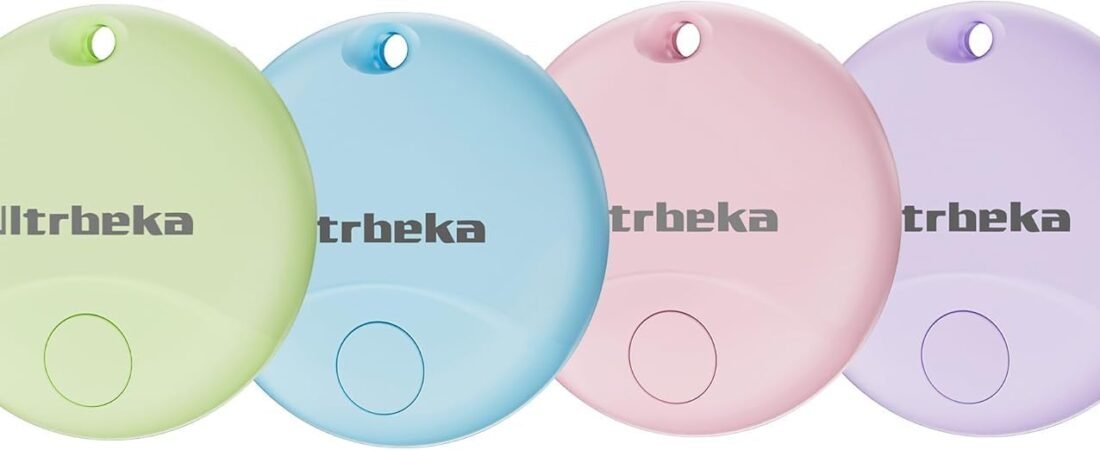
The Ultrbeka Air Tracker Tag 4 Pack is a compact Bluetooth item-finding system designed specifically for Apple’s Find My ecosystem. The product is listed as MFi certified and compatible with iPhone and iPad devices. It uses Bluetooth communication and can be added to Apple’s Find My app, allowing users to associate individual trackers with different belongings. Available product information identifies the model as UBT004/UBT-NEW1 and lists a four-unit package.
The four-pack format is particularly relevant for people who want to track several everyday items at the same time. Instead of moving a single tracker between a set of keys, a backpack, luggage, and another frequently misplaced belonging, each item can have its own tag.
The trackers are also described as having an IP67 water-resistance rating and replaceable CR2032 batteries. Current product information gives battery-life estimates of around 18 months, although actual battery life can vary with usage and operating conditions.
Because this product works with Apple Find My, it is important to understand what that means in practice. The Ultrbeka tags are not general-purpose trackers for every smartphone platform. The available documentation states that the UBT001/Ultrbeka Air Tracker family is designed for Apple’s Find My network and works with iOS devices rather than Android.
This guide explains how the Ultrbeka Air Tracker Tag works, the main features to understand, practical ways to use the four trackers, setup considerations, limitations, and how this type of Apple-compatible Bluetooth tracker compares with other item-finding technologies.
Key Features
Apple Find My Compatibility
The most important feature of the Ultrbeka Air Tracker Tag is its integration with Apple’s Find My ecosystem.
According to available product information, the tracker is MFi certified and designed to work with Apple Find My on compatible iPhone and iPad devices.
After pairing a tracker with a compatible Apple device, the user can assign it a name and associate it with a particular belonging. The available user instructions describe opening the Find My app, selecting the Items section, choosing the option to add another item, and following the pairing instructions.
This approach can be useful because item management takes place inside an application that many iPhone users already use for Apple’s device-finding functions.
Instead of having a completely separate tracking application, the tag becomes part of the user’s existing Find My environment.
Four Individual Trackers
The package contains four tracker tags.
This makes it possible to create a simple system for several belongings. For example, a user could assign:
- One tracker to house keys
- One to a backpack
- One to luggage
- One to a wallet or equipment case
The specific arrangement can be changed at any time, but keeping a consistent association between each tag and its item makes the Find My list easier to understand.
For families, a four-pack can also provide several independent trackers without requiring everyone to share one physical device.
Bluetooth Connectivity
The Ultrbeka tracker communicates using Bluetooth. Available product specifications identify Bluetooth as its connectivity technology.
Bluetooth is useful for short-range communication between the tracker and a compatible Apple device.
When the item is nearby, the Find My app can be used to trigger the tracker’s sound. This can help locate belongings that are somewhere inside a home, office, vehicle, or another nearby environment.
Bluetooth itself should not be confused with long-distance cellular tracking. When a tracker is outside the user’s immediate Bluetooth range, the wider Apple Find My network can play a role in updating its location when the tag is detected by participating Apple devices.
Find My Network
One of the important differences between a simple Bluetooth finder and a tracker integrated with a large device-finding ecosystem is what can happen when the tracked item is no longer nearby.
The Ultrbeka product is designed to use Apple’s Find My network. Product information explains that nearby Apple devices can help update the location of a lost tracker when they detect it.
This means the user does not necessarily need to remain within direct Bluetooth range of the tracker to receive a location update.
For example, if a tagged bag is accidentally left somewhere, its location may be updated if compatible Apple devices participating in the Find My network detect the tag.
The process is designed around Apple’s network architecture rather than a cellular connection built directly into each Ultrbeka tag.
Nearby Sound Alert
The tracker can play a sound when the user asks Find My to locate it nearby.
Available product information describes an approximately 80 dB sound level and indicates that the sound can help locate items within a nearby environment.
A sound alert can be useful when an item is visually hidden.
Keys might be under furniture, a wallet may be inside another bag, or a backpack may have been placed in an unexpected room. Rather than searching every location manually, the user can activate the sound and follow the audible signal.
Actual audibility depends on the environment. Cushions, bags, closed spaces, background noise, and distance can all affect how easily the sound can be heard.
Left-Behind Notifications
Available Ultrbeka product information describes a left-behind reminder that can notify the user when an item has been separated from them.
This type of feature can be useful because prevention is often more convenient than recovery.
For example, a user may leave a wallet, backpack, or set of keys behind after leaving a location. A notification can provide an opportunity to return before the item becomes genuinely difficult to recover.
The availability and exact behavior of notifications can depend on the Find My configuration, iPhone settings, permissions, and Apple’s current software behavior.
Users should therefore check their device’s notification settings during setup.
Replaceable CR2032 Battery
The tracker uses a replaceable CR2032 coin-cell battery. Available documentation describes the battery as replaceable, while current listings give an expected service life of approximately 18 months.
A replaceable battery can make long-term ownership more straightforward because the tracker does not have to be recharged every few weeks.
Instead, the battery can be replaced when it reaches the end of its useful life.
Battery life is an estimate rather than a fixed guarantee. Usage patterns, temperature, wireless activity, and other factors can affect how long a battery lasts.
IP67 Water Resistance
The Ultrbeka tracker is listed with an IP67 rating.
IP67 generally indicates protection against dust ingress and temporary immersion under specified test conditions. Available Ultrbeka documentation describes protection involving immersion up to approximately one meter for up to 30 minutes.
This characteristic can be useful for everyday items that encounter rain, splashes, or accidental water exposure.
Nevertheless, water-resistance ratings are based on controlled test conditions. Users should not deliberately expose the tracker to water simply because it has an IP rating, and seals can change over time through wear or physical damage.
Compact Form Factor
The Ultrbeka tracker is designed to remain small enough to attach to everyday belongings.
Available documentation for the related UBT001 design lists dimensions around 38 mm by 38 mm, although exact dimensions can vary by model and listing.
A compact form factor is important for an item tracker because a large or heavy accessory can become inconvenient when attached to keys, bags, or other portable objects.
Key Ring Attachment
The product is supplied with attachment accessories intended to make it easier to connect the trackers to belongings such as keys, bags, backpacks, luggage, and other items. The manufacturer product page specifically describes included key rings for this purpose.
This can simplify installation.
For a set of keys, the tracker can be attached directly through a key ring. For luggage or a backpack, it can be attached to a suitable loop or handle.
How It Can Be Used
Tracking House Keys
Keys are among the most common items people misplace.
A tracker attached to a key ring can help in two different ways.
First, the user can use Find My to locate the tracker when it is nearby and trigger its sound.
Second, the Find My system can provide location information associated with the tracker when it has been detected by the broader network.
The nearby sound function is particularly useful inside the home. If the keys were placed somewhere unusual, the sound can reduce the amount of time spent checking every room.
Tracking a Wallet
A wallet can be difficult to locate because it is small and can easily disappear inside a larger bag.
Attaching a compact tracker to a suitable wallet attachment or using an appropriate holder can provide another way to identify its location.
The left-behind notification feature can also be useful for people who regularly leave belongings behind when moving between locations.
Because wallets can contain sensitive financial information and identification documents, a tracker should complement rather than replace normal precautions.
Tracking Backpacks
Backpacks are useful candidates for Bluetooth trackers because they move between many locations.
A student may carry one between home, school, public transportation, and a library. A professional may take one between home, an office, a coffee shop, and meetings.
Attaching one tracker to the backpack provides a consistent way to identify its location in Find My.
Luggage and Travel Bags
Travel is another practical application.
A tracker can be attached to luggage before a flight, train journey, road trip, or hotel stay.
If luggage becomes separated from its owner, the Find My network may provide additional location information when the tracker is detected by nearby Apple devices.
This does not eliminate the need for standard travel precautions. Travelers should still use appropriate luggage identification, follow airline procedures, and keep important documents and valuables secure.
Camera and Electronics Bags
Photographers and content creators often transport equipment in dedicated bags.
A tracker can be attached to a camera bag, laptop bag, equipment case, or another container rather than directly attaching it to individual pieces of equipment.
This approach keeps the number of trackers manageable while still providing a way to identify the location of the main container.
Outdoor Equipment
The IP67 rating can make the tracker relevant to outdoor belongings that may experience rain or splashes.
Possible examples include backpacks, cycling equipment, outdoor bags, and travel accessories.
Water resistance does not mean the tracker is designed for unlimited underwater use, however. It should still be treated as an electronic accessory that benefits from reasonable protection.
Multiple Household Items
The four-pack format can support a household-wide setup.
One possible arrangement could be:
| Tracker | Example Assignment |
|---|---|
| Tracker 1 | Main house keys |
| Tracker 2 | Backpack |
| Tracker 3 | Luggage |
| Tracker 4 | Wallet or equipment case |
The user can then rename each tracker in Find My so that the digital list corresponds clearly to the physical belongings.
This can be especially helpful when several trackers are being used simultaneously.
Setting Up the Ultrbeka Tracker With Apple Find My
Confirm Compatibility First
Before setting up the tracker, confirm that the primary device is compatible with the product.
Available documentation states that the Ultrbeka Air Tracker is designed for Apple’s Find My ecosystem and is iOS-only. It is not intended for Android devices.
This is one of the most important considerations because a tracker designed for Apple Find My is fundamentally different from a universal Bluetooth tracker that supports multiple smartphone platforms.
Install or Open Find My
On a compatible iPhone or iPad, open the Find My application.
The available Ultrbeka instructions describe using the Items section and selecting the option to add another item.
Activate the Tracker
The setup documentation indicates that the tracker needs a working CR2032 battery and may need to be placed into pairing mode according to the instructions.
The tag produces a sound during the setup process when ready for pairing.
Assign a Name
Once the tracker appears, assign a meaningful name.
Examples include:
- House Keys
- Work Backpack
- Black Suitcase
- Camera Bag
Clear names are useful when several tags appear in the Find My Items list.
Test the Sound
After setup, use the Find My app to test the nearby sound.
This confirms that the tag has been paired correctly and gives the user an idea of how loud it sounds in the environment where it will normally be used.
Test Notifications
If left-behind alerts are important, check that the relevant notifications are enabled.
Phone-level settings can affect whether notifications are delivered, so it is worth checking the Find My and notification settings after installation.
Who It May Be Suitable For
iPhone and iPad Users
The Ultrbeka Air Tracker is specifically designed for Apple’s Find My ecosystem and is listed as compatible with iPhone and iPad devices.
For users already invested in Apple’s ecosystem, integrating the tracker into Find My can provide a familiar way to manage tracked belongings.
Families With Several Items to Track
A four-pack allows multiple belongings to be equipped simultaneously.
A household might use different trackers for keys, backpacks, luggage, and other frequently misplaced items.
Frequent Travelers
People who regularly travel can attach trackers to luggage, backpacks, camera bags, or equipment cases.
The Find My network can provide an additional source of location information if a tagged item becomes separated from its owner.
Students
Students often carry backpacks, laptops, keys, sports equipment, and other portable belongings.
A tracker attached to the primary backpack can provide a simple layer of item awareness.
Professionals
People who regularly transport equipment, documents, laptop bags, or work materials may use a tracker on the primary bag.
Outdoor Users
The IP67 rating can be useful for belongings exposed to rain and occasional water contact, provided the tracker is used within the limitations of its water-resistance rating.
Important Things to Consider
It Is Designed for Apple Devices
The biggest compatibility limitation is that this tracker is designed for Apple’s Find My ecosystem.
Available documentation explicitly states that the Ultrbeka Air Tracker works exclusively with iOS devices and is not compatible with Android.
An Android user should therefore consider a tracker designed for the Android ecosystem instead.
This is not a minor software difference. The tracking network, pairing process, and application integration are tied to Apple’s ecosystem.
Bluetooth Does Not Mean Unlimited Range
The tracker communicates locally using Bluetooth, but its overall Find My functionality can extend beyond direct Bluetooth range through Apple’s network.
These are two different mechanisms.
When the tag is nearby, the user’s iPhone can communicate directly with it.
When the tag is farther away, location updates may come through other participating Apple devices that detect the tracker.
The latter depends on the presence of compatible devices and network conditions. It should not be interpreted as a cellular connection built into the tracker.
Find My Network Availability Matters
Network-assisted location is inherently dependent on other devices participating in the Find My ecosystem.
In a busy city, a lost tracker may encounter many compatible devices. In a remote location, there may be fewer opportunities for the tracker to be detected.
Consequently, network-based location should be viewed as an additional capability rather than a guarantee that a tracker will report its position everywhere.
It Is Not a GPS Tracker
The Ultrbeka Air Tracker does not need a cellular subscription because it is not a standalone cellular GPS tracker.
Its location system is based on Bluetooth and Apple’s Find My network.
This can make the device small and power-efficient, but it also means it should not be treated like a dedicated GPS tracking unit designed for continuous independent location reporting.
Battery Life Is an Estimate
Current listings give an approximately 18-month battery-life figure, while other Ultrbeka documentation for related models lists different expected durations.
This variation illustrates why battery-life numbers should be treated as estimates.
Actual battery duration depends on operating conditions, usage, temperature, and other factors.
Users should replace the CR2032 battery when the system indicates that the battery is low rather than waiting for the tracker to stop working.
Water Resistance Has Limits
IP67 is useful protection, but it does not mean the tracker is indestructible or permanently waterproof.
The rating is based on specific test conditions. Physical damage, aging seals, improper battery-cover installation, or other changes can affect protection.
After replacing the battery, make sure the housing is correctly closed according to the manufacturer’s instructions.
Privacy and Responsible Tracking
Bluetooth trackers are designed to help people locate their own belongings.
They should not be used to secretly track another person.
Apple’s Find My ecosystem includes measures intended to help address unwanted tracking, and users should follow Apple’s guidance regarding unknown or unwanted trackers.
The appropriate use of an item tracker is transparent tracking of belongings or tracking situations where everyone involved has appropriate knowledge and consent.
Small Battery Safety
The tracker uses a CR2032 coin-cell battery.
Coin batteries can be dangerous if swallowed, particularly by young children.
Keep spare and removed batteries away from children and pets and dispose of used batteries according to local requirements.
A Tracker Does Not Prevent Theft
A Bluetooth tracker can provide location information, but it does not physically secure an item.
For valuable belongings, users should still use appropriate locks, secure storage, identification, insurance, or other security measures.
A tracker should be viewed as one layer of an overall approach to protecting belongings.
Comparison of General Item-Finding Categories
Apple Find My-Compatible Bluetooth Trackers
The Ultrbeka Air Tracker belongs to this category.
These trackers are designed to integrate with Apple’s Find My ecosystem and are particularly relevant to iPhone and iPad users.
Their major advantage is ecosystem integration: the user can manage tracked items from Apple’s Find My application, while network-assisted finding can help when an item is no longer within direct Bluetooth range.
The limitation is platform compatibility. An iOS-focused tracker is not automatically suitable for Android users.
Standard Bluetooth Trackers With Their Own Apps
Some Bluetooth trackers operate through their own smartphone applications.
These systems may support iPhone and Android, depending on the manufacturer.
Their advantage can be broader platform support, while their operation may involve a separate app, account, or proprietary network.
GPS and Cellular Trackers
GPS/cellular trackers are designed for situations requiring independent long-distance location communication.
They can be used for applications such as vehicles, equipment, or other assets where continuous or frequent location information is more important.
However, they generally involve different hardware, power requirements, and potentially subscription-based cellular services.
They are therefore a different category from small Bluetooth item finders.
Traditional Identification Methods
A simple luggage tag, engraved identification plate, or contact card does not provide electronic tracking.
Nevertheless, physical identification remains useful.
For luggage and bags, combining a physical contact method with an electronic tracker can provide two different ways to help recover an item.
Frequently Asked Questions
What is the Ultrbeka Air Tracker Tag?
The Ultrbeka Air Tracker Tag is a Bluetooth item finder designed to work with Apple’s Find My ecosystem. The four-pack provides four individual trackers that can be attached to belongings such as keys, wallets, backpacks, and luggage.
Does the Ultrbeka tracker work with Android?
The available Ultrbeka documentation states that the tracker is designed for Apple’s Find My network and works with iOS devices. It is not compatible with Android.
Does it work with iPhone?
Yes. The product is specifically designed for iPhone and iPad devices that support Apple’s Find My ecosystem.
Is the Ultrbeka Air Tracker MFi certified?
The product is marketed as MFi certified, indicating that it is designed for compatibility with Apple’s ecosystem.
How many trackers are included?
The product configuration described in the listing is a four-pack containing four individual tracker tags.
Can the tracker find keys?
Yes. Keys are one of the intended use cases. A tracker can be attached to a suitable key ring and then located through the Find My app when appropriate.
Can it be used with luggage?
Yes. Product information specifically identifies luggage and backpacks among potential applications.
Can it track a wallet?
A tracker can be attached to a wallet or suitable wallet holder. The compact format is intended for everyday belongings, although users should make sure the attachment method is secure.
Does the Ultrbeka tracker make a sound?
Yes. The tracker can play an audible alert through the Find My app when it is within an appropriate connection range. Available product information describes an approximately 80 dB sound level.
Can the Find My network locate the tracker when it is far away?
The product is designed to use Apple’s Find My network, which can help update the location of a tracker when it is detected by nearby participating Apple devices.
The availability of an update depends on network conditions and the presence of participating devices.
Does it have a replaceable battery?
Yes. The tracker uses a replaceable CR2032 battery.
How long does the battery last?
Current product information gives an approximate 18-month battery life, but actual duration can vary. Related Ultrbeka documentation lists somewhat different estimates, so users should treat battery-life figures as approximate.
Is the tracker waterproof?
The Ultrbeka Air Tracker is listed with an IP67 rating. Available documentation describes protection against dust and temporary immersion under specified conditions.
Can I use the tracker in the rain?
The IP67 rating provides protection for suitable everyday exposure such as rain, but users should still avoid unnecessary water exposure and follow the manufacturer’s instructions.
Does the tracker use GPS?
No. It is a Bluetooth tracker designed to work with Apple’s Find My network. It does not function as an independent cellular GPS tracker.
Does it require a cellular subscription?
The product is designed around Bluetooth and Apple Find My rather than an integrated cellular connection, so it is not a conventional cellular GPS tracker requiring its own mobile-data plan.
Can I use all four trackers with one iPhone?
The four individual tags are designed to be added as separate items in the Find My environment. Each can be assigned its own name so the user can distinguish between belongings. The exact number of items a user can manage may also depend on Apple’s current Find My limits and account configuration.
Can I rename the tracker?
The available setup instructions describe assigning a name and choosing an icon when registering the tracker in Find My.
This makes names such as “House Keys” or “Travel Backpack” practical when managing several tags.
Does the tracker have a left-behind alert?
Available Ultrbeka product information describes a left-behind reminder that can notify an iPhone user when a tagged item is separated from them.
The actual notification behavior can depend on Find My and device settings.
Can the tracker be used for pets?
Some product materials mention pet-related applications, but a Bluetooth item tracker should not be treated as a dedicated pet-safety device. If attached to a collar, it should be secured safely and should not create a choking or snagging hazard.
For animals that may travel significant distances, a purpose-built pet tracking system may be more appropriate.
Conclusion
The Ultrbeka Air Tracker Tag 4 Pack is designed to provide a straightforward way for iPhone and iPad users to keep track of multiple everyday belongings through Apple’s Find My ecosystem.
Its four-tag configuration allows users to assign separate trackers to keys, wallets, backpacks, luggage, equipment bags, and other portable items. Bluetooth provides nearby communication, while Apple’s Find My network can help provide location updates when a tagged item is outside direct Bluetooth range and encountered by participating Apple devices.
The tracker also includes practical features for everyday use, including an audible finding function, a replaceable CR2032 battery, and an IP67 water-resistance rating. Current product information lists approximately 18 months of battery life, although actual performance can vary depending on conditions and usage.
At the same time, compatibility is an important consideration. This product is designed for Apple’s Find My environment and is not intended for Android devices.
It is also important to distinguish Bluetooth item tracking from GPS tracking. The Ultrbeka tag does not independently communicate its position through a cellular network. Instead, it relies on Bluetooth communication and the broader Apple Find My network.
For someone who already uses an iPhone and wants several small trackers for frequently misplaced belongings, the four-pack format provides a way to create a consistent item-finding system across multiple possessions. The most effective setup is one in which each tag remains securely attached to its assigned item and the user keeps the Find My application and notification settings properly configured.
As with any electronic tracker, it should complement rather than replace sensible security habits. Valuable items should still be protected appropriately, physical identification can remain useful, and users should understand the privacy implications and responsible-use expectations associated with tracking technology.
For users interested in examining the current specifications, compatibility information, and four-pack configuration,
you can check more details on Amazon here.
Amazon Associates Disclosure: As an Amazon Associate, we earn from qualifying purchases.