Introduction
Keeping track of everyday belongings can be difficult, particularly when the same items move between home, work, school, travel, and public places. Keys can be left in another room, bags can be forgotten in a vehicle, luggage can become separated from its owner, and pet accessories can disappear into the garden or another part of a property.
Bluetooth item trackers provide one way to add digital location assistance to these everyday situations. Instead of relying entirely on memory, a user can attach a small electronic tag to a belonging and use a compatible smartphone application to help identify its location.
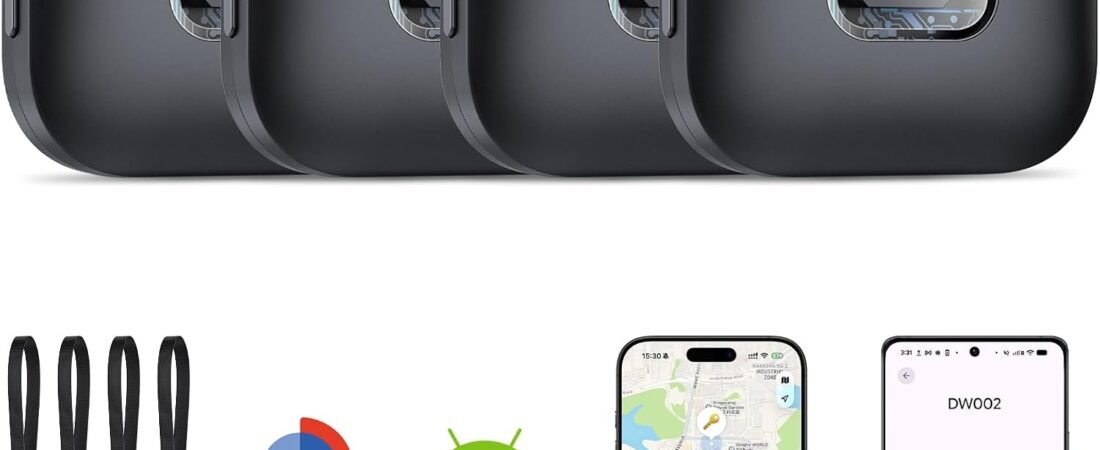
The Hoxe Air Tracker Tags 4-Pack is designed as a multi-tag item-finding solution for both iOS and Android users. The product is intended for everyday belongings such as keys, bags, luggage, and pet accessories. Its four-pack configuration allows multiple objects to be tracked independently rather than moving one tracker from item to item.
A major point to understand with this type of product is the difference between Bluetooth item tracking and GPS tracking. A Bluetooth tracker does not necessarily contain its own cellular connection or continuously transmit its position from anywhere in the world. Instead, it communicates with compatible smartphones and, depending on the product’s supported ecosystem and network functions, may use nearby devices to help update the location of an item.
For users considering a four-pack, the main question is therefore not simply whether a tag can “track” something. It is how the tags communicate, what smartphone platforms they support, how nearby finding works, what happens when an item is far away, and what limitations should be expected in everyday use.
This guide examines those areas in detail. It explains the general operation of the Hoxe Air Tracker Tags, practical applications for keys, bags, luggage, and pets, considerations for iOS and Android users, battery and connectivity issues, responsible tracking, and how Bluetooth trackers compare with other item-location technologies.
Key Features
Four-Tag Configuration
The most immediately practical feature of the Hoxe Air Tracker package is the inclusion of four separate tracker tags.
A four-pack can be organized around several frequently misplaced belongings.
For example, a household could assign the tags as follows:
| Tracker | Possible Item |
|---|---|
| Tag 1 | House keys |
| Tag 2 | Main backpack |
| Tag 3 | Travel luggage |
| Tag 4 | Pet collar or accessory |
Another user could dedicate all four tags to different family members, work equipment, camera bags, wallets, or other portable belongings.
Having several independent trackers also makes the system easier to maintain. A tag can remain permanently attached to its assigned item rather than being removed whenever another belonging needs to be tracked.
iOS and Android Support
The product is marketed for both iOS and Android users, which distinguishes it from trackers designed exclusively around one smartphone ecosystem.
For households where some people use iPhones and others use Android phones, cross-platform compatibility can be useful.
However, “iOS and Android compatible” does not necessarily mean that every feature works identically on both platforms.
Bluetooth trackers can rely on different apps, operating-system permissions, background Bluetooth behavior, and network services. Before setting up the tags, users should therefore follow the current Hoxe instructions for their specific phone platform and verify which functions are supported.
Operating-system updates can also change menus and permission requirements over time.
Bluetooth Connectivity
The core technology behind a compact smart tag is generally Bluetooth.
Bluetooth allows the tag to communicate with a compatible smartphone when the device is within a suitable nearby range.
This local connection is particularly useful for objects that have been misplaced around the home.
For example, if a set of keys is somewhere in the house, the phone can communicate with the tag and trigger its locating function, depending on the supported app and tag configuration.
Bluetooth should not be confused with cellular communication. A basic Bluetooth tracker does not automatically provide continuous worldwide location information.
Nearby Item Finding
A nearby-finding function is one of the main reasons people attach trackers to everyday objects.
Suppose a user remembers having a backpack earlier in the day but cannot remember where it was placed at home. Instead of searching every room immediately, the user can use the tracking application to communicate with the tag.
If the tag is within Bluetooth range, the application can provide a way to identify or locate it.
The exact effective range varies according to the tracker, smartphone, building structure, interference, and other environmental conditions.
Walls and floors can significantly affect Bluetooth communication.
Audible Alert
A sound-producing tracker can make nearby finding easier.
Once the tag is connected through the appropriate application, the user can trigger an audible alert and listen for the tracker.
This is especially useful when an item is visually hidden.
Keys may be under a sofa cushion, a backpack may be inside a closet, or a bag may have been left behind another object.
The sound does not guarantee that the tracker will always be immediately audible. A bag, drawer, thick clothing, furniture, or background noise can reduce the perceived volume.
The alert should therefore be treated as a locating aid rather than a guaranteed solution in every environment.
Compact Design
A smart item tracker needs to remain small enough to attach to ordinary belongings without becoming inconvenient.
A compact tag can be placed on keys, attached to a bag, or secured to another appropriate item without significantly changing how the object is normally carried.
This is particularly relevant for travel. A tracker that takes up very little space can remain attached to luggage throughout a trip.
Multiple Attachment Options
Depending on the included accessories and current product configuration, a tracker of this type may be attached using a key ring, loop, holder, adhesive solution, or another suitable mounting method.
The attachment method should match the object.
For keys, a key-ring connection is generally straightforward.
For luggage, a strap or handle attachment may be more practical.
For a pet, any attachment should be secure without creating a snagging, choking, or discomfort hazard.
Users should inspect the attachment periodically, especially when the tagged item is exposed to movement, friction, or outdoor conditions.
Replaceable Battery Design
Compact Bluetooth trackers commonly use small replaceable coin-cell batteries, although the exact battery specification should be confirmed against the current Hoxe documentation for the particular version.
A replaceable battery can be convenient because the tracker does not need to be recharged every few days.
Instead, the battery can remain installed until its charge is depleted, after which the user can replace it.
Battery life is affected by usage, wireless activity, temperature, and other environmental factors. Any advertised battery duration should therefore be treated as an estimate rather than a fixed guarantee.
Smartphone-Based Management
Using a smartphone application allows users to assign tags to specific belongings.
Clear naming becomes particularly important when several tags are active.
Instead of leaving four trackers with generic names, a user could assign descriptive labels such as:
- House Keys
- Work Backpack
- Suitcase
- Dog Collar
This makes the system easier to understand when several objects appear in the application.
How It Can Be Used
Finding House Keys
Keys are among the most obvious candidates for an item tracker.
A tag can remain attached to a key ring so that it is always available when the keys are used.
When the keys are misplaced somewhere within the local Bluetooth environment, the user can use the compatible application to initiate the finding process.
If the tag produces an audible alert, listening for the sound can help narrow down the search.
This can be especially useful in homes with several rooms or multiple people who regularly move the same set of keys.
Tracking a Backpack
A backpack can travel through many different environments during a normal day.
A student might take it between home, school, a library, and public transportation. A professional might move between an office, home, meetings, and cafés.
Attaching a tracker to the backpack gives the user another way to identify its location.
It can also make a four-pack more practical because one tracker can remain permanently assigned to the backpack while the other three are used for different belongings.
Luggage and Travel Bags
Travel creates several situations where tracking assistance can be useful.
A suitcase may be left in a hotel room, placed in a different vehicle, separated from the owner during transportation, or temporarily misplaced in a busy terminal.
Attaching a tracker to the luggage provides an additional digital reference point.
The tracker does not replace luggage tags or travel documentation. A physical identification tag containing appropriate contact information can still be useful if someone finds the luggage.
Using both methods provides different forms of identification.
Wallets and Small Personal Items
Wallets can be difficult to locate because they are small and easily placed inside other bags or pockets.
A tracker can be used with an appropriate wallet holder or attachment method.
The sound feature can be useful if the wallet is somewhere nearby, while a network-assisted tracking function, if supported by the product’s application, may provide additional location information when the item is separated from the user’s phone.
Because wallets can contain payment cards and identification documents, users should continue following normal financial-security practices.
A tracker is an additional recovery aid, not a substitute for cancelling cards or protecting personal information after a wallet is lost.
Camera Bags and Electronics Cases
Camera equipment, laptops, tablets, and other electronics are often carried in dedicated bags.
Rather than placing a separate tracker on every device, one tag can be attached to the primary case.
This provides a practical balance between tracking coverage and simplicity.
If the equipment bag is misplaced, the user can use the tracker to help identify its location.
Pet Accessories
The product is marketed for pet-related applications, making a pet collar or harness another possible use.
However, users should approach this application carefully.
A tracker should not create a choking or snagging risk. It should also not interfere with the animal’s movement or comfort.
A Bluetooth item tracker should not automatically be considered a replacement for a purpose-built GPS pet tracker.
If a pet regularly travels beyond Bluetooth range, a dedicated GPS/cellular pet-tracking system may be more appropriate because it is designed specifically for broader geographic tracking.
Children’s Bags
Parents may choose to attach a tracker to a child’s backpack, school bag, sports bag, or another personal item.
The tracker should be attached to the property rather than being used as a covert method of tracking another person.
Parents and guardians should also understand how the specific application handles location sharing, notifications, and privacy.
Sports Equipment
Sports bags, tennis equipment cases, cycling accessories, and other portable equipment can also be suitable candidates.
A tracker attached to the main bag can help distinguish it from similar-looking equipment in a gym, club, school, or vehicle.
Work Equipment
People who move between job sites may carry tools, equipment bags, documents, or electronics.
A tracker can provide an additional organizational layer for these items.
For businesses, however, users should check company policies before attaching personal tracking devices to workplace equipment.
How to Create a Practical Tracking System
Assign One Tag to One Important Item
A simple system is easier to maintain.
Instead of moving a tracker between multiple belongings, permanently assign each tag to a particular object.
For example:
Tag 1: Daily keys
Tag 2: Work backpack
Tag 3: Travel suitcase
Tag 4: Camera bag
This arrangement reduces the chance of forgetting which tracker belongs to which item.
Use Clear Names
If the tracking application allows custom names, use descriptive names.
“Tracker 1” does not provide much information.
“Black Travel Suitcase” immediately tells the user what they are looking for.
This becomes more valuable as the number of tracked objects increases.
Test the System at Home
Before relying on the tracker during travel, test it in the environment where it will normally be used.
Place the tagged item in different rooms and observe how the connection behaves.
Try placing it behind furniture or inside a bag.
This gives the user a realistic understanding of how walls, floors, and objects affect Bluetooth communication.
Check Notification Permissions
A tracking application may require Bluetooth, location, notification, or background permissions depending on the features it provides.
If a permission is disabled, some functions may not work correctly.
Users should review the application’s setup instructions and their smartphone’s settings after installation.
Check the Battery Periodically
A tracker can remain attached to an item for months without being noticed.
That creates a potential problem: the tracker itself may eventually run out of battery.
Checking battery status periodically is especially important for luggage, emergency bags, or equipment that may not be used frequently.
Understanding Bluetooth Tracking
Bluetooth Finding Is Local
Bluetooth is primarily a short-range communication technology.
When a smartphone communicates directly with a tracker, the two devices need to be within a suitable communication range.
The exact distance varies considerably.
Open spaces can produce different results from buildings with concrete walls, multiple floors, metal structures, and wireless interference.
Therefore, advertised range numbers should be interpreted as specifications measured under particular conditions rather than universal guarantees.
Network-Assisted Finding Is Different
Some smart trackers use a broader device network to help locate items that are no longer within direct Bluetooth range.
The concept is relatively straightforward.
A tracker that is separated from its owner’s smartphone can potentially be detected by another compatible smartphone or device.
That device can then communicate the tracker’s approximate location through the supported network.
Whether and how this works depends on the specific Hoxe model, its application, the network architecture, and current software support.
Users should therefore consult the current manufacturer’s instructions rather than assuming that every feature available on one tracking ecosystem is available on another.
Bluetooth Is Not GPS
A Bluetooth tracker does not automatically provide a continuously updated map of an object’s movements.
A dedicated GPS tracker generally uses satellite positioning and another communication method, such as cellular data, to transmit its location.
Bluetooth trackers use a different architecture.
This difference affects battery life, size, subscription requirements, network dependence, and the situations where each type of device is most appropriate.
Who It May Be Suitable For
iPhone Users
Users with iPhones can use Bluetooth item trackers through supported applications and ecosystems.
Before setup, they should verify that the Hoxe model supports the particular iOS version and application required.
Android Users
The product is specifically marketed as supporting Android as well as iOS.
Android users should still check the current app requirements, supported Android versions, Bluetooth permissions, and available tracking features before relying on the system.
Different Android manufacturers can implement background permissions differently, so notification behavior may vary.
Families
A four-pack gives a household several trackers to distribute among important belongings.
A family could use tags for keys, backpacks, luggage, and another frequently misplaced object.
Frequent Travelers
Travelers may attach tags to suitcases, backpacks, camera bags, or other equipment.
Having a tracker already attached before a journey can be more practical than trying to remember to install one immediately before departure.
Pet Owners
A tag may be used with an appropriate pet accessory where safe and practical.
However, users should distinguish between a Bluetooth item tracker and a dedicated pet GPS device.
Students
Students can use tags on backpacks, instrument cases, sports bags, or other portable belongings.
Professionals
Work bags, equipment cases, and portable technology can all potentially benefit from an item-finding system.
Important Things to Consider
Confirm the Exact App and Compatibility
Product names can sometimes be used across multiple versions or batches.
Before setup, verify the exact model’s instructions and the application it requires.
“iOS and Android compatible” is helpful, but it does not necessarily mean every feature behaves identically on both platforms.
Bluetooth Range Varies
Do not assume that a tracker will communicate at the same distance in every building.
Concrete walls, elevators, metal structures, furniture, and other wireless devices can affect Bluetooth performance.
The best way to understand the real-world range is to test the tracker in the environment where it will be used.
Network Coverage Is Not Guaranteed
If the Hoxe tracker includes a network-assisted finding function, its effectiveness depends on the presence of compatible devices and the underlying network.
A tracker in a crowded city may encounter many compatible devices.
A tracker in a remote location may encounter very few.
Therefore, network-assisted location should be treated as an additional recovery mechanism rather than a guarantee.
A Tracker Does Not Prevent Theft
A smart tag can help identify where an item may be located, but it does not physically secure it.
Valuable items should still be protected through locks, secure storage, identification, insurance, and other appropriate measures.
Battery Replacement Matters
The tracker is only useful when it has sufficient battery power.
If the product uses a replaceable coin cell, keep compatible replacement batteries available.
After replacing a battery, confirm that the tracker is still connected to the application and functioning correctly.
Water Resistance Should Be Understood Carefully
If the specific Hoxe version includes a water-resistance rating, users should follow the manufacturer’s stated conditions.
Water resistance is not the same as waterproofing.
Avoid deliberate immersion unless the manufacturer specifically states that the device is designed for that use.
Pet Safety Requires Special Attention
A tracker attached to a pet should be secured in a way that does not create a hazard.
Inspect the attachment regularly.
A tag should never be considered more important than the animal’s comfort and safety.
For pets that can travel significant distances, dedicated GPS equipment may provide a more appropriate tracking solution.
Privacy and Responsible Use
Item trackers are intended to help users locate belongings.
They should not be used for covert surveillance of people or unauthorized property.
If a tracker is shared between family members or used in a household, everyone should understand what is being tracked and how location information is handled.
Smartphone Permissions Can Affect Performance
Modern smartphones manage background activity aggressively to preserve battery life.
An Android device may restrict an application’s background operation, Bluetooth access, location access, or notifications.
If a tracker appears to work inconsistently, checking application permissions and battery-optimization settings can be an important troubleshooting step.
Comparison of General Tracking Categories
Bluetooth Item Trackers
Bluetooth trackers are designed primarily for personal belongings.
They are small, relatively power-efficient, and convenient for items such as keys, wallets, bags, and luggage.
Their direct communication range is limited, but some products can extend their practical finding capabilities through a broader network.
The Hoxe four-pack belongs to this general category.
GPS and Cellular Trackers
GPS/cellular trackers are designed for more independent geographic tracking.
They typically combine satellite positioning with cellular communication.
This can make them suitable for vehicles, pets, equipment, and other applications where a wider tracking area is required.
However, they generally consume more power and may require cellular service or subscriptions.
Dedicated RF Key Finders
A dedicated RF finder uses a handheld transmitter and separate receivers.
It may not require a smartphone at all.
This can make such systems simple for local household use.
The limitation is that the finder generally operates only within its radio range and does not provide the broader network-based capabilities associated with smartphone ecosystems.
Smartwatch and Phone Finding
Modern smartphones and smartwatches can sometimes help locate each other through their respective ecosystems.
This can be convenient for electronics already connected to an account.
An item tracker fills a different role because it can be physically attached to objects that do not have their own location hardware.
Traditional Identification
A physical label remains one of the simplest recovery tools.
Name tags, contact cards, engraved information, and luggage labels do not require batteries or wireless networks.
They can complement an electronic tracker and remain useful if the electronic device becomes unavailable.
Frequently Asked Questions
What is the Hoxe Air Tracker Tag?
The Hoxe Air Tracker Tag is a compact smart item finder designed to help users locate belongings such as keys, bags, luggage, and pet accessories. The product is sold in a four-pack configuration and is marketed for iOS and Android users.
How many trackers are included?
The product configuration in the supplied Amazon listing is a four-pack, providing four individual tracker tags.
Does it work with iPhone?
The product is marketed as compatible with iOS devices. Users should follow the current Hoxe setup instructions for the specific model and supported application.
Does it work with Android?
Yes, the product is marketed for Android as well as iOS. Compatibility can depend on the exact Android version, application, and required permissions.
Can the Hoxe tracker find keys?
Yes. Keys are one of the most common applications for small Bluetooth item trackers. A tag can be attached to a key ring or suitable holder and located through the supported tracking application.
Can it track luggage?
A tracker can be attached to luggage, a suitcase, backpack, or travel case. Depending on the product’s supported network features, the application may provide location information when the item is outside direct Bluetooth range.
Can it be used for a pet?
The product is marketed for pet-related use. If attaching a tracker to a pet collar, users should make sure the attachment is secure and does not create a choking, snagging, or discomfort risk.
A dedicated GPS pet tracker may be more appropriate for animals that regularly travel far beyond local Bluetooth range.
Does it use Bluetooth?
The product is marketed as a Bluetooth smart tracker. Bluetooth provides the short-range wireless connection between the tag and compatible devices.
Is it a GPS tracker?
It should not be treated as a standalone GPS/cellular tracker. A Bluetooth item finder and a GPS tracker use different technologies and provide different types of location information.
Can it track an item anywhere in the world?
Users should not interpret a Bluetooth tracker as providing guaranteed worldwide continuous tracking.
If the product supports network-assisted finding, its location may be updated when compatible devices detect it, but coverage depends on the surrounding network and device availability.
Does it need a smartphone?
The tracking system is designed around smartphone connectivity, so a compatible smartphone and the appropriate application are generally required for the digital locating functions.
Can the tracker make a sound?
The product is designed as an item finder, and users should consult the current product documentation for the exact audible-alert functionality of their model. If a sound function is available, it is intended primarily to help locate nearby items.
How far can a Bluetooth tracker work?
There is no single universal Bluetooth range.
Actual performance depends on the tracker, smartphone, Bluetooth implementation, walls, interference, furniture, and other environmental factors.
A manufacturer’s range figure should be viewed as a measurement under particular conditions rather than a guaranteed indoor distance.
Does the tracker need Wi-Fi?
Bluetooth communication itself does not require the tracker to connect to a Wi-Fi router.
However, some network-assisted location features may require the smartphone or supporting service to have internet connectivity.
The exact requirements depend on the Hoxe application and its supported features.
Does it require a monthly subscription?
A basic Bluetooth tracker does not inherently require a cellular subscription.
However, users should check the current Hoxe application terms and feature set because third-party services can change over time.
How long does the battery last?
Battery life depends on the exact Hoxe model, battery type, usage, temperature, and other factors. Users should rely on the current product documentation rather than treating an advertised duration as a guaranteed operating period.
Is the battery replaceable?
The exact battery type and replacement procedure should be confirmed from the current Hoxe documentation for the supplied model.
If the tracker uses a replaceable coin-cell battery, users should keep replacement batteries available and handle them carefully.
Can I use four trackers on four different items?
That is one of the main practical reasons to choose a four-pack. Each tracker can be assigned to a different belonging, subject to the limits and functionality of the compatible application.
Can I rename each tracker?
Most modern item-finding applications allow individual trackers to be assigned descriptive names. Users should follow the Hoxe app’s current instructions for naming and organizing multiple tags.
Names such as “House Keys,” “Travel Bag,” “Backpack,” and “Pet Collar” can make multiple trackers easier to identify.
Can I use the tracker on a wallet?
Yes, provided the tracker can be attached securely using an appropriate holder or mounting method.
What happens if the tracker battery dies?
A tracker with a depleted battery cannot perform its normal wireless functions. This is why checking battery status periodically is particularly important for items that are rarely used.
Can I use it to secretly track someone?
A personal item tracker should not be used for covert tracking of another person or unauthorized property.
Tracking technology should be used transparently and responsibly, particularly when other people’s privacy is involved.
Conclusion
The Hoxe Air Tracker Tags 4-Pack is designed around a practical everyday problem: keeping track of belongings that are easy to misplace or accidentally leave behind.
With four separate tags, users can create a simple tracking system for keys, bags, luggage, pet accessories, backpacks, equipment cases, or other portable items. The multi-tag format also allows each tracker to remain attached to its assigned belonging instead of being moved from one object to another.
The product’s support for both iOS and Android makes it relevant to households and individuals using different smartphone platforms. At the same time, users should verify the exact application, operating-system requirements, and available features for their particular Hoxe model because smartphone software and manufacturer implementations can change.
Bluetooth tracking is particularly useful for nearby finding. A tag attached to keys can help narrow down their location inside a home, while a tag on a backpack can provide an additional way to identify the bag if it is misplaced.
Where supported, network-assisted location can extend the usefulness of a tracker beyond direct Bluetooth range by relying on compatible nearby devices. However, this should not be confused with continuous GPS tracking. A Bluetooth tracker does not automatically provide an independent, always-on location signal from anywhere in the world.
For luggage, work equipment, and outdoor belongings, a tracker can complement traditional protection methods such as physical identification labels, secure storage, and appropriate insurance. For pets, it can provide another way to identify an accessory or nearby animal, but a dedicated GPS pet-tracking system may be more appropriate when long-distance location information is required.
Users should also remember the practical limitations of small wireless trackers. Bluetooth performance can vary between buildings, network-assisted location depends on the surrounding device ecosystem, batteries eventually need attention, and smartphone permissions can affect background operation.
Used with those limitations in mind, a four-tag Bluetooth system can become a useful organizational tool for everyday belongings.
If you would like to examine the current product configuration and available specifications,
you can check more details on Amazon here.
Amazon Associates Disclosure: As an Amazon Associate, we earn from qualifying purchases.