Introduction
Misplacing everyday belongings is a common inconvenience. Keys can disappear between furniture cushions, a wallet can be left behind during a busy day, and luggage can become difficult to identify or locate when traveling. A small item tracker can add another layer of organization by connecting a physical belonging with a smartphone-based finding system.
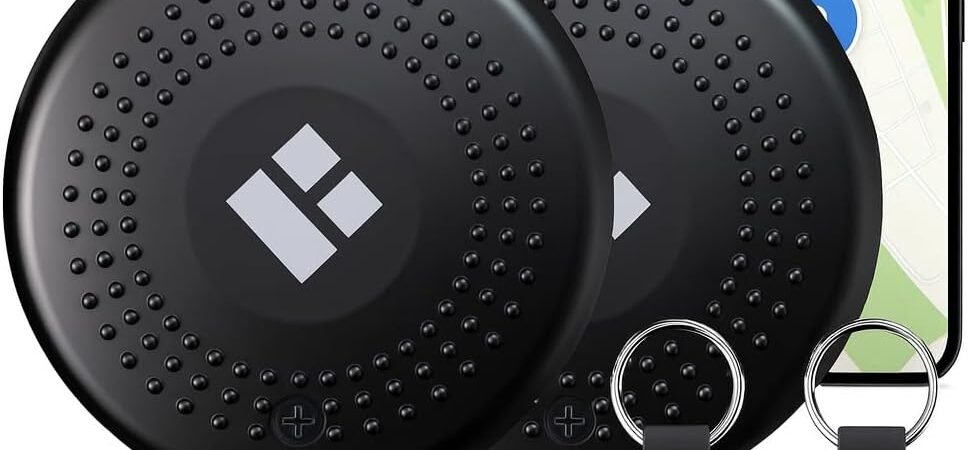
The Tech Solutions Smart Tracker Tag with Audible Alarm, Bluetooth, 2-Pack is a compact Bluetooth item-finding system designed to work with Apple’s Find My ecosystem. The product is associated with Tech Solutions and Merkury Innovations, with the model family identified in technical documentation as TS-WP013-101 / TS-WP213-101. Certification records identify the FindMate Dot models as Find My-compatible products, while the FCC documentation identifies Bluetooth Low Energy operation in the 2.4 GHz range.
The two-pack format allows two separate belongings to have their own tracker. A user could, for example, place one tag on a set of keys and another on a travel bag, backpack, wallet holder, or other frequently misplaced item.
The system is designed around Apple’s Find My application rather than a separate proprietary tracking platform. Apple’s current support documentation explains that compatible third-party item finders can be registered to an Apple Account through Find My and then located through the Items section of the app.
The tracker also includes an audible alarm intended to help locate an item when it is nearby. Product information describes the alarm as approximately 80–100 dB, while available listings identify an IPX4 weather-resistant design and a replaceable CR2032 battery.
Understanding how the technology works is important because a Bluetooth item finder is not the same thing as a standalone GPS tracker. The tag does not independently establish a cellular connection and continuously transmit its own position. Instead, nearby Bluetooth communication and the Apple Find My network work together to help identify the location of a registered item.
This guide explains the main features of the Tech Solutions Smart Tracker Tag 2-Pack, practical ways to use it, how Apple Find My integration works, who may find this type of tracker useful, important limitations to consider, and how Bluetooth item finders compare with other tracking technologies.
Key Features
Apple Find My Compatibility
The central feature of the Tech Solutions Smart Tracker Tag is its compatibility with Apple’s Find My ecosystem.
Technical documentation identifies the product as a FindMate Dot and states that it is designed to work with Apple Find My. The manufacturer’s instructions explain that users can open Find My, select the Items section, add another item, choose the supported smart tag, and complete registration to their Apple Account.
Apple itself explains that certain third-party products can be paired with an Apple Account and managed through the Find My app. Once registered, users can see the item in the Items section and use supported finding features.
This integration can be useful for people who already use Apple devices because the tracker can become part of the same general finding environment used for other supported Apple and third-party products.
Two-Tag Configuration
The product is supplied as a two-pack.
That allows two belongings to be tracked independently rather than requiring one tag to be moved from one item to another.
For example:
| Tracker | Possible Assignment |
|---|---|
| Tag 1 | House or car keys |
| Tag 2 | Backpack or luggage |
Another user might assign the two tags to a wallet and camera bag, work bag and travel case, or two sets of keys.
The important point is that each tracker can be given a recognizable name in Find My. Apple’s current instructions allow users to rename supported third-party items and select an icon or emoji, making it easier to distinguish multiple trackers.
Bluetooth Low Energy Connectivity
The Tech Solutions FindMate Dot uses Bluetooth Low Energy technology. FCC documentation for the TS-WP013-101 and TS-WP213-101 models identifies operation in the 2402–2480 MHz range using Bluetooth Low Energy modulation.
Bluetooth allows the tracker to communicate with nearby Apple devices.
When a tagged item is close to the owner’s iPhone, the Find My system can interact with the tracker directly. This is especially useful when the user knows the item is somewhere nearby but cannot immediately see it.
Bluetooth also provides the underlying communication method used when compatible Apple devices in the broader Find My network detect a lost item.
Audible Alarm
An audible alarm is one of the most practical features for finding an item inside a familiar environment.
Product information describes an alarm in the approximate range of 80–100 dB.
The idea is simple: if the tracker is somewhere nearby, the user can activate the sound through the appropriate finding function and listen for the alert.
This can be useful when keys are under a sofa cushion, a backpack is inside another room, or a wallet has slipped underneath furniture.
The actual volume perceived by the user will depend on distance and surroundings. Soft furniture, bags, drawers, walls, and background noise can all reduce how easily an electronic alarm can be heard.
The alarm therefore works best as a locating aid rather than a guarantee that an item will always be immediately audible.
Find My Network
The Find My ecosystem extends beyond the direct Bluetooth connection between a user’s iPhone and the tracker.
Apple describes the Find My network as a crowdsourced network using nearby Apple devices to detect compatible missing items and report approximate location information to the owner. Apple says the process is designed with end-to-end encryption and anonymity to protect users’ privacy.
This can be important when a tagged item is no longer within direct Bluetooth range of its owner.
For example, imagine that a backpack is accidentally left in a public location. The owner’s iPhone may not be able to communicate directly with the tracker once the backpack is far away. However, another compatible Apple device that comes near the tag may help the Find My network update the item’s approximate location.
This does not mean the Tech Solutions tracker contains GPS or cellular hardware.
Instead, the network uses compatible Apple devices as part of the location-detection process.
Left-Behind Notifications
Available product information describes proximity or left-behind alerts as part of the tracker’s functionality. These notifications are intended to help users notice when they have moved away from a tracked item.
Apple also supports separation alerts for supported items in Find My.
This type of feature changes the role of a tracker from simply helping recover something after it is lost to potentially helping prevent the loss in the first place.
For instance, a user might leave a restaurant with their phone but accidentally leave a bag behind. A separation notification can provide an opportunity to return before traveling farther away.
Notification behavior depends on the device, Find My settings, and current software configuration, so users should verify that notifications are enabled after setup.
Replaceable CR2032 Battery
The Tech Solutions tracker uses a replaceable coin-cell battery. Product information identifies a CR2032 battery for the FindMate Dot design.
A replaceable battery has an important practical advantage for a tracker that is intended to remain attached to an item for extended periods.
Instead of connecting the tracker to a charging cable periodically, the user can replace the battery when it reaches the end of its useful life.
Battery performance varies depending on operating conditions, usage, temperature, and other factors. It is therefore sensible to monitor battery status through the appropriate device or application notifications rather than treating any stated battery duration as a guaranteed operating period.
IPX4 Weather Resistance
Available product information identifies an IPX4 weather-resistant design.
IPX4 protection is intended for resistance to water splashes from different directions under specified testing conditions.
This can make the tracker more practical for everyday belongings that may encounter light rain or accidental splashes.
It is important not to interpret IPX4 as waterproofing for immersion. The tracker should not be deliberately submerged or treated as an underwater device.
Compact Item-Finding Format
The FindMate Dot is designed as a small item tracker rather than a large electronic module.
This matters because a tracker needs to remain convenient when attached to objects such as keys, bags, luggage, and wallets.
A small tracker is less likely to interfere with normal use of the item, provided it is attached securely and in an appropriate location.
How It Can Be Used
Finding House Keys
Keys are a natural application for a Bluetooth tracker.
A tracker can be attached to a key ring so that the tag stays with the keys during everyday use.
If the keys are misplaced somewhere inside the home, the user can open Find My and use the available locating functions to help determine their location. When the tag is close enough, the audible alarm can provide a useful additional clue.
The sound can be particularly helpful when the keys are hidden from view.
Instead of checking every surface, the user can follow the sound and gradually narrow down the search area.
Tracking a Work Backpack
A work backpack may move between a home office, workplace, car, café, meeting room, or public transportation.
Attaching a tracker to the backpack provides an additional way to identify its location through Find My.
A consistent tracker name such as “Work Backpack” can also make the Items list easier to understand.
For professionals who regularly carry laptops, documents, chargers, and other equipment, the tracker does not replace normal security practices, but it can add another layer of awareness.
Luggage and Travel Bags
Travel introduces many opportunities for belongings to become separated from their owners.
A tracker can be placed on a suitcase, carry-on bag, camera case, or another travel item.
If the item is nearby, the audible alert can help identify it. If the item becomes separated from the user, the Find My network may provide an approximate location update when compatible Apple devices detect the tag.
This can be particularly relevant in busy environments such as airports, train stations, hotels, and conference centers.
However, a tracker should complement traditional luggage identification. Travelers should still use appropriate name or contact tags and follow airline or transportation procedures.
Tracking a Wallet
Wallets are small and easy to place in unexpected locations.
A tracker can be attached using an appropriate holder or attachment method.
The audible alarm can be helpful when the wallet is somewhere nearby, while Find My can provide additional information if the wallet has been left somewhere farther away.
Because wallets contain sensitive financial and identification information, users should continue using normal security measures even when a tracker is attached.
Finding a Camera or Electronics Bag
Photography and technology equipment often travels in dedicated cases.
Rather than attaching a tracker to every individual item, a user can attach one to the primary camera bag, laptop case, or equipment pouch.
This provides a relatively simple way to associate a physical container with a digital item in Find My.
If the case is misplaced inside a building, the sound function may help locate it. If it becomes separated from the user, network-assisted finding may provide additional information.
Tracking Outdoor Bags
An IPX4 weather-resistant design can be useful for everyday outdoor activities where light rain or splashing may occur.
A tracker can be attached to a backpack, sports bag, or other portable equipment.
The water-resistance rating should still be respected. It does not mean the tracker is designed for swimming, prolonged exposure to water, or immersion.
Organizing Two Important Belongings
The two-pack configuration is useful when a user has two items that are consistently important.
For example:
Tag 1: Daily keys
Tag 2: Travel luggage
This arrangement can make the tracker system easy to maintain because each tag remains permanently assigned to one object.
Another approach is to keep one tracker on a frequently used personal item and reserve the second for occasional travel.
How Apple Find My Fits Into the System
Registering a Third-Party Item
Apple provides a standard process for adding compatible third-party trackers to Find My.
On an iPhone, the user follows the manufacturer’s instructions to make the tracker discoverable, opens Find My, goes to the Items section, selects the option to add another item, connects the tracker, names it, and registers it to the Apple Account.
The Tech Solutions manual follows a similar process, instructing users to open Find My, select Items, choose “Add New Item” and “Other Supported Items,” then select the smart tag and complete registration.
Exact menu wording can change as Apple’s operating systems evolve, so users should follow the current on-screen instructions if they differ from older documentation.
Naming Each Tracker
Clear naming becomes increasingly useful when several trackers are registered.
Instead of leaving a generic device name, users could choose:
- House Keys
- Work Bag
- Black Suitcase
- Camera Case
Apple supports renaming compatible third-party items from the Find My application.
This reduces the chance of selecting the wrong tracker when several items are displayed.
Locating a Nearby Item
Apple’s current Find My documentation explains that a registered third-party item can appear on the map when it can be located. If the item is nearby, the user can play a sound to help find it.
This creates two useful stages of locating:
- Check the item’s reported location.
- Use the sound when the item is believed to be nearby.
That combination can make the transition from “I don’t know where it is” to “I know roughly where to look” more practical.
When the Item Cannot Be Located
If the item cannot currently be located, Apple says Find My can display the last known location and time, and users can enable a “Notify When Found” option.
This is an important distinction.
The tracker does not necessarily provide a continuously updated position at every moment.
Location updates depend on communication with the Find My network.
Understanding the Find My Network
It Is Not a Cellular GPS Tracker
Bluetooth item trackers are sometimes described casually as “GPS trackers,” but that terminology can be misleading.
The Tech Solutions Smart Tracker Tag is a Bluetooth-based Find My accessory. FCC documentation identifies Bluetooth Low Energy operation in the 2.4 GHz band.
The tag itself does not operate like a cellular GPS unit with its own mobile-data connection.
Instead, the Find My network can use nearby Apple devices to detect compatible accessories.
Network Density Can Affect Location Updates
Apple describes the Find My network as a large network of Apple devices that can help identify the approximate location of missing compatible items.
This means the environment matters.
A tracker in a busy urban area may have many opportunities to encounter participating devices.
A tracker in a remote area may have fewer opportunities.
Consequently, network-assisted location should be understood as a powerful network capability rather than a promise of continuous location reporting in every place.
Location Is Approximate
Apple’s documentation refers to the location of a third-party item when it connects to the Find My network.
Users should therefore interpret a displayed position in context.
A map location can indicate where the item was detected, but it should not automatically be interpreted as a precise measurement of the item’s exact physical position at every moment.
Who It May Be Suitable For
iPhone Users
The Tech Solutions tracker is primarily relevant to people using Apple devices that support the Find My ecosystem.
The manufacturer’s documentation specifically provides Apple-device pairing instructions, while Apple’s support documentation explains how compatible third-party Find My accessories are registered and located.
Frequent Travelers
Travelers can use trackers on luggage, backpacks, camera cases, and other equipment.
The Find My network can provide an additional source of information if a tagged item becomes separated from the owner.
Students
Students often move between classrooms, libraries, dormitories, transportation, and home.
A tracker attached to a backpack or equipment case can provide a way to locate the item when it is misplaced.
Professionals
Work bags containing laptops, documents, chargers, or specialized equipment can be suitable candidates.
A tracker does not replace workplace security policies, but it can provide another method for identifying the bag’s location.
Families
A two-pack can be divided between two commonly misplaced belongings.
For households already using Apple devices, managing both tags through the Find My ecosystem can keep the setup relatively centralized.
People Who Prefer App-Based Finding
Some users prefer managing technology from their phones rather than carrying a separate RF remote.
Because the Tech Solutions tracker integrates with Find My, its core locating process takes place through an Apple device.
Important Things to Consider
Compatibility Is Important
Before setting up the tracker, confirm that the intended device supports the Find My accessory system.
The Tech Solutions product documentation is built around Apple’s Find My environment.
A tracker designed for Apple’s ecosystem should not automatically be assumed to provide equivalent functionality on Android.
If a household uses different smartphone platforms, users should check compatibility before assigning trackers.
The Product Depends on the Find My Ecosystem
The tracker is not a completely independent tracking system.
Its location functionality depends on Apple’s Find My infrastructure and compatible Apple devices.
This can be an advantage for people already using that ecosystem, but it also means that software compatibility and Apple account settings matter.
Bluetooth Range Is Not the Same as Network Range
Bluetooth provides the local connection between the tag and nearby devices.
The Find My network can extend the practical location capability beyond direct Bluetooth range because other Apple devices can detect compatible trackers.
These are separate mechanisms.
A user should not interpret a Bluetooth range specification as the maximum geographic distance at which the tracker can ever be located, nor should the Find My network be interpreted as guaranteed coverage everywhere.
The Alarm Is a Locating Aid
The audible alarm can help identify a nearby object, but sound behaves differently depending on the environment.
A tracker inside a thick bag may be harder to hear.
A tracker underneath furniture may sound muffled.
A crowded airport or busy street may make a small alarm difficult to distinguish.
The sound should therefore be combined with the map and location information provided by Find My.
Weather Resistance Is Limited
The IPX4 rating described for the product means users should think in terms of splash resistance rather than full waterproofing.
Do not intentionally submerge the tracker.
If the device becomes exposed to significant moisture, allow it to dry appropriately and follow manufacturer guidance.
Battery Replacement Is Part of Ownership
The CR2032 battery is replaceable, but that also means users need to remember that the battery eventually requires replacement.
A tracker can be attached to an item for months and then be forgotten itself.
Checking battery status periodically is particularly sensible for luggage, emergency bags, or other belongings that may not be used every day.
Small Coin Batteries Require Care
CR2032 batteries are small coin cells.
They should be kept away from children and pets because accidental ingestion can be dangerous.
Used batteries should be handled and disposed of according to applicable local requirements.
A Tracker Does Not Prevent Theft
The purpose of an item tracker is to help identify or locate a belonging.
It does not physically prevent someone from taking that belonging.
Valuable equipment should still be secured using appropriate locks, storage, identification, insurance, and other protective measures.
Responsible Tracking Matters
Find My-compatible tracking devices include protections intended to reduce unwanted tracking.
Apple explicitly warns that AirTag and Find My network accessories should not be used to track people without their consent or to track property that does not belong to the user.
The appropriate use of the Tech Solutions tracker is to locate personal belongings or property that the user is authorized to track.
Comparison of General Item-Tracking Categories
Apple Find My-Compatible Bluetooth Trackers
The Tech Solutions Smart Tracker Tag belongs to this category.
These products combine Bluetooth hardware with Apple’s Find My ecosystem.
Their major characteristic is integration: users can manage compatible trackers through the Find My application alongside other supported items.
They can be particularly convenient for people who already use iPhones and other Apple devices.
Bluetooth Trackers With Proprietary Apps
Some item trackers use their own applications rather than Apple’s Find My system.
These products may offer support for both iOS and Android, depending on the manufacturer.
Their operation can involve a separate app, account, or proprietary finding network.
The choice between a proprietary ecosystem and Apple Find My is therefore partly a matter of which devices and services the user already relies on.
GPS and Cellular Trackers
GPS/cellular trackers are designed for a different purpose.
A cellular tracker can potentially communicate its location over a wide geographic area because it has access to a mobile network.
This makes the category more appropriate for applications where independent long-distance tracking is required.
Such devices can also involve larger batteries, additional hardware, recurring connectivity costs, and different privacy considerations.
Dedicated RF Key Finders
Some key-finder systems use a dedicated radio transmitter and receiver rather than Bluetooth and a smartphone.
These systems can be very simple to operate because no app or account is required.
Their main limitation is local range. They generally do not offer the broader network-based location capabilities available through ecosystems such as Apple Find My.
Traditional Identification Tags
A physical name tag, contact card, or engraved identification plate provides no electronic tracking, but it remains useful.
For luggage, bags, and equipment, a physical identification method can complement an electronic tracker.
If the tracker battery is depleted or the item cannot be detected electronically, visible contact information may still provide a way for an honest finder to return the property.
Frequently Asked Questions
What is the Tech Solutions Smart Tracker Tag?
It is a compact Bluetooth item finder designed to help users locate belongings through Apple’s Find My ecosystem. The two-pack configuration provides two individual trackers. Technical documentation identifies the product family as the FindMate Dot.
Does it work with Apple Find My?
Yes. The Tech Solutions documentation provides instructions for registering the smart tag through Apple’s Find My application, and certification information identifies the FindMate Dot models as Find My-compatible products.
Does the tracker use Bluetooth?
Yes. FCC documentation for the TS-WP013-101 and TS-WP213-101 models identifies Bluetooth Low Energy operation in the 2.4 GHz range.
How many trackers are included?
The product configuration in the supplied Amazon listing is a two-pack, providing two separate smart tracker tags.
Can it find keys?
Yes. Keys are among the intended applications for the Tech Solutions smart tracker. The manufacturer and retailer materials also describe applications involving wallets, luggage, bags, and pets.
Can it track luggage?
A tracker can be attached to luggage or another suitable travel bag. If the item becomes separated from the owner, the Find My network may provide an approximate location when compatible Apple devices detect the tracker.
Does the tracker have an audible alarm?
Yes. Available product information describes a built-in audible alarm with a stated range of approximately 80–100 dB.
Can I hear the tracker if it is under a couch?
If the tracker is within a suitable connection range, its audible alarm can help locate it. However, cushions and furniture can reduce the apparent volume, so the sound may be muffled.
Does it have a replaceable battery?
Yes. Product information identifies a replaceable CR2032 battery.
Is the tracker waterproof?
Available product specifications describe the tracker as IPX4 weather-resistant. This means it is designed to handle splashes under specified conditions, not prolonged immersion.
Does it use GPS?
No. The tracker uses Bluetooth and the Apple Find My network rather than functioning as an independent cellular GPS tracker.
Can it work when it is far away from my iPhone?
A Find My-compatible tracker can potentially be located through the wider Find My network when nearby Apple devices detect it. Apple explains that compatible devices can securely report approximate locations of missing items to the owner.
The availability of an update depends on the network environment and nearby participating devices.
Does the tracker need a monthly subscription?
Available product information states that the Tech Solutions tracker does not require a subscription for its Find My functionality.
Users should still distinguish between the tracker itself and any unrelated paid services they may use on their Apple devices.
How do I add it to Find My?
The manufacturer’s instructions describe opening Find My, selecting Items, choosing to add another item, selecting the supported smart tag, and completing registration to the Apple Account.
Apple’s current instructions similarly direct users to Find My, Items, Add, and Add Other Item for supported third-party accessories.
Can I rename the tracker?
Yes. Apple supports renaming compatible third-party items within Find My and allows users to select a custom name and icon.
Names such as “House Keys” or “Travel Bag” can make a multi-tracker setup easier to manage.
What happens if the item cannot currently be located?
Apple explains that Find My can show the last known location and time when an item cannot currently be located, and users can enable a notification for when the item is found again.
Can the tracker be used with Android?
The available setup documentation is specifically based on Apple’s Find My system. Users should not assume that this particular model provides equivalent functionality on Android. Before purchasing or assigning the tracker to an Android-only user, compatibility should be verified with the current manufacturer information.
Can I use it to track another person?
The tracker should not be used for covert tracking of people.
Apple specifically states that Find My network accessories should not be used to track people without their consent.
The appropriate purpose is locating belongings or property that the user is authorized to track.
Can it be used with pets?
Product materials list pets among possible applications.
However, a Bluetooth item tracker should not automatically be treated as a dedicated pet-safety system. If attached to a collar, it should be secure and comfortable, and users should understand that network-based finding is not equivalent to continuous GPS pet tracking.
What is the difference between this and a GPS tracker?
The Tech Solutions Smart Tracker communicates through Bluetooth and uses Apple’s Find My network for broader location assistance.
A standalone GPS/cellular tracker uses satellite positioning and a mobile network to communicate location information independently.
The two categories are designed for different purposes and have different power, connectivity, and operating requirements.
Conclusion
The Tech Solutions Smart Tracker Tag with Audible Alarm, Bluetooth, 2-Pack is designed to help Apple users keep track of everyday belongings through a combination of Bluetooth connectivity, audible alerts, and the Apple Find My ecosystem.
The two-pack configuration allows two separate belongings to be tracked simultaneously. Keys, wallets, backpacks, luggage, work bags, camera cases, and other portable items can all be potential applications when the tracker can be attached securely.
Its audible alarm provides a practical way to locate a nearby item, while integration with Find My adds map-based location information and access to Apple’s wider network of participating devices. Apple explains that compatible third-party accessories can be registered through Find My and that the network can help locate missing items when nearby Apple devices detect them.
The technical design is based on Bluetooth Low Energy rather than cellular GPS. FCC documentation identifies Bluetooth operation in the 2.4 GHz range for the FindMate Dot models associated with this product family.
Other practical characteristics include a replaceable CR2032 battery and an IPX4 weather-resistant enclosure, according to available product information.
At the same time, users should understand the limitations. The tracker does not provide guaranteed continuous location information, network coverage varies according to the surrounding Apple-device environment, and the audible alarm may be harder to hear when an item is enclosed or surrounded by noise. Weather resistance should also not be confused with full waterproofing.
Privacy is another important consideration. Find My accessories are designed with anti-unwanted-tracking protections, and Apple states that these products should not be used to track people without consent or property that does not belong to the user.
For iPhone users who want a straightforward way to add electronic finding capabilities to two everyday belongings, the Tech Solutions Smart Tracker Tag provides an approach centered around an existing Apple ecosystem rather than a separate tracking platform.
If you would like to examine the product’s current configuration and specifications,
you can check more details on Amazon here.
Amazon Associates Disclosure: As an Amazon Associate, we earn from qualifying purchases.